Inside the SME Compliance Tracker: A Walkthrough for GDPR, ISO 27001 & Multi-Framework Compliance
If you're a UK SME compliance lead, ops manager, or HR head responsible for proving your organisation is compliant, you already know the dirty secret. Most SMEs aren't non-compliant. They just can't prove they're compliant fast enough when an auditor, a customer's procurement team, or the ICO comes asking.
This walkthrough is a hands-on tour of the DocInsightHub AI compliance tracker, anchored on GDPR and ISO 27001:2022, the two frameworks most UK SMEs are juggling. One thing worth flagging up front: this isn't a checklist tool with AI bolted on. AI is woven through every level of the tracker, from the organisation-wide dashboard to individual control evidence, doing the parts that usually take days. If you do nothing else, try this workflow on one of your own frameworks. You'll see things you didn't know you were missing.
Why SME Compliance Tracking Breaks Down
The honest pattern: a compliance lead joins, inherits a folder of policies, and tries to keep track of what's done with a spreadsheet. The spreadsheet works for about six weeks. Then someone leaves, a policy gets revised, the framework adds a new control, and the spreadsheet rots. By the time an audit, a procurement questionnaire, or a customer due-diligence form arrives, the team is on the back foot.
The fundamental problem isn't the spreadsheet. Spreadsheets are fine. It's that evidence lives in a different system to the tracker, ownership lives in someone's head, and history is whatever the most recent saved-over version remembers. The DocInsightHub tracker takes a different starting point: every framework you're accountable to lives in one place, evidence links straight to documents you've already uploaded, and AI does the work of mapping policy text to controls, finding evidence, and analysing gaps.
A Single Source of Truth Across Frameworks
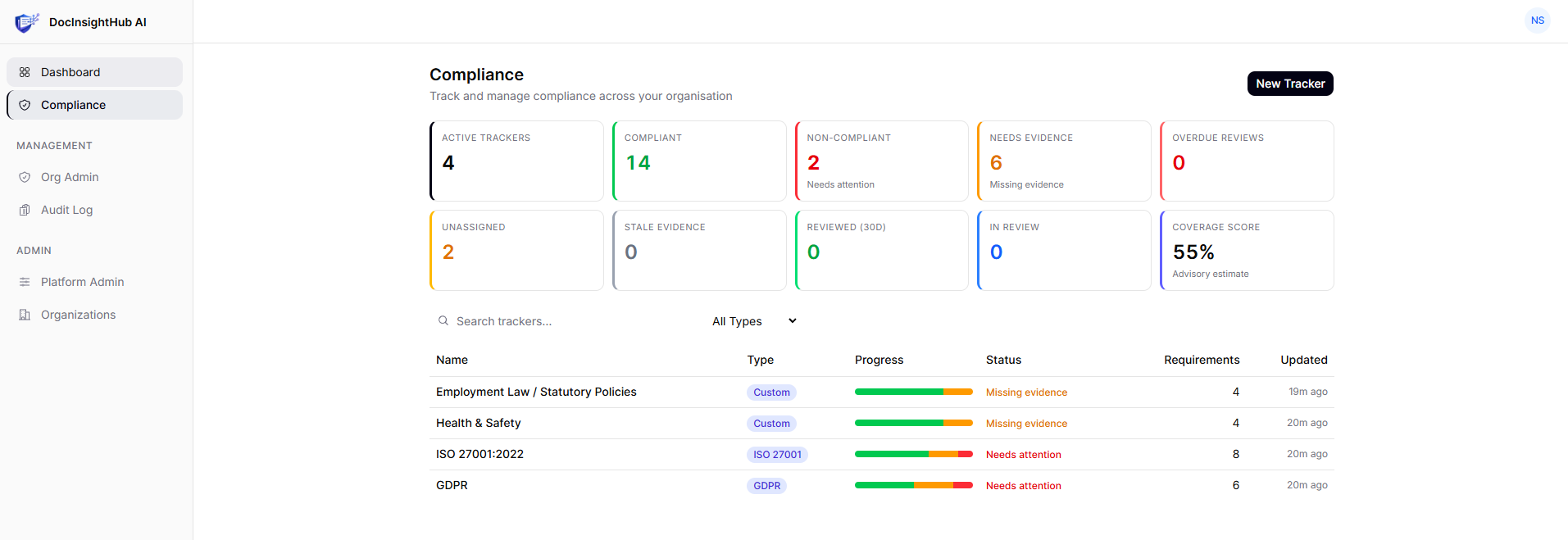
The top level is the dashboard above. Four trackers run in parallel (GDPR, ISO 27001:2022, Health & Safety, and Employment Law / Statutory Policies), each with their own coverage score, status breakdown, and recent activity. The org-wide metrics across the top tell you what matters before any audit conversation: 14 compliant requirements, 2 non-compliant, 6 needing evidence, 2 unassigned. Coverage score: 55%, advisory.
The part that matters most for ops and compliance leads working across multiple frameworks: the same policy document often satisfies controls in two or three frameworks. Your data retention policy is evidence for GDPR Article 5(1)(e) and ISO 27001 control A.5.33. In a spreadsheet, you'd duplicate that link three times. Here, the document is referenced once and pulled into every framework that needs it.
The Framework View: AI Reads Your Tracker For You
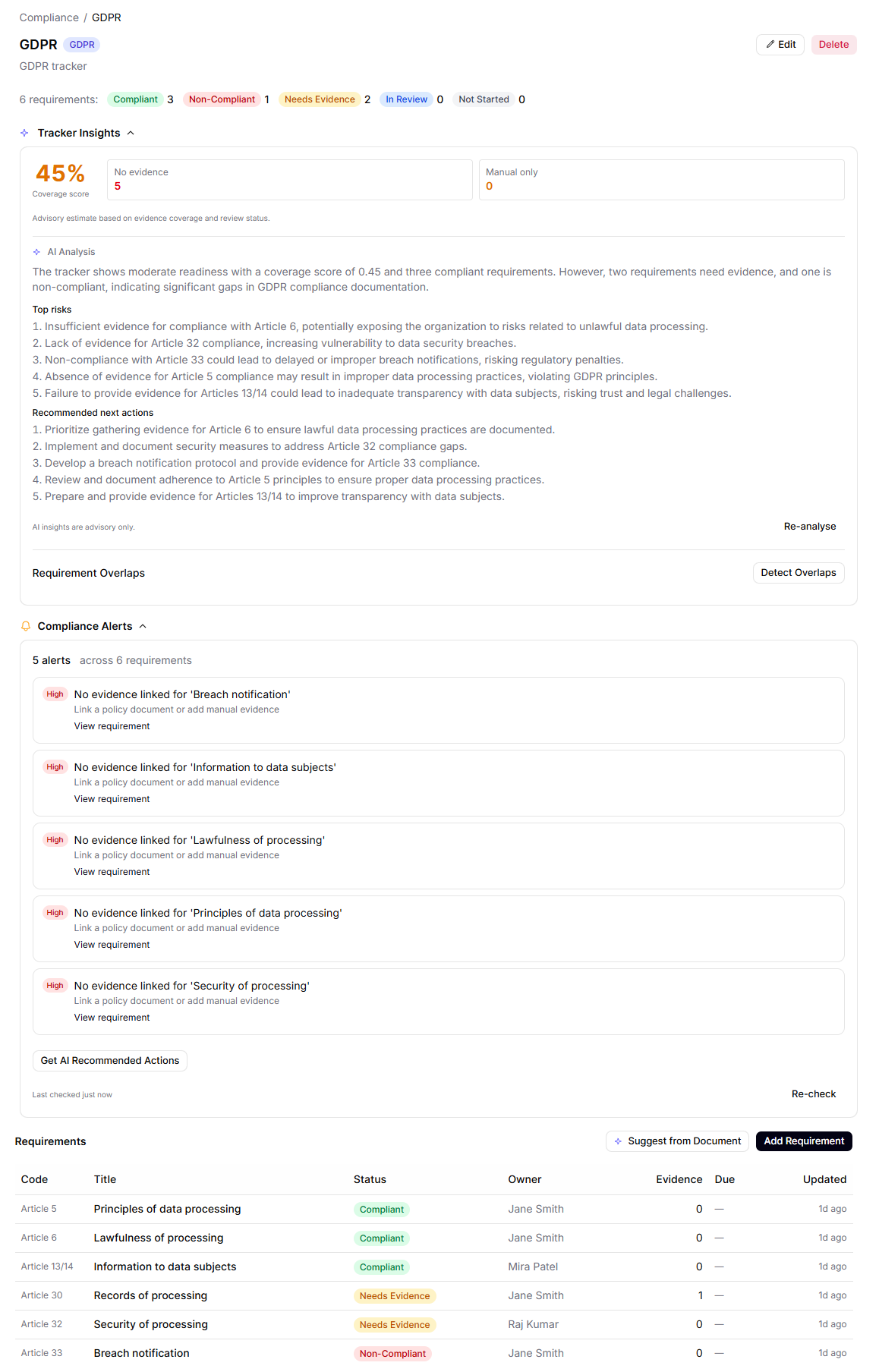
This is where the differentiation starts. Click Analyse Tracker and the AI doesn't return a generic GDPR primer. It reads your tracker state and writes a paragraph specific to your gaps:
"The tracker shows moderate readiness with a coverage score of 0.45 and three compliant requirements. However, two requirements need evidence, and one is non-compliant, indicating gaps in critical areas like processing records, security, and breach notification."
Followed by a numbered list of top risks (specific Article references) and recommended next actions (concrete operational steps, not vague advice). It's a one-click compliance analyst's report.
The Compliance Alerts panel below it is just as honest. Notice the alerts flagging "No evidence linked for 'Lawfulness of processing'" on requirements marked Compliant. The AI is calling out the contradiction an auditor would spot in five seconds: status says yes, evidence says nothing. That single feature would catch out most compliance spreadsheets immediately.
Right next to all this is an Ask AI panel for natural-language questions, scoped to the framework and grounded in your uploaded documents:
![Ask AI panel scoped to GDPR. The question asks what evidence is typically expected for Article 30. The answer is a structured response covering Records of Processing Activities, maintenance and review, and exemptions, with inline [1] citations on every claim, a 'medium confidence' badge, and a Sources section showing the document the answer came from with a snippet preview.](/blog/compliance-tracker-walkthrough/02c-ask-ai-with-answer.png)
Asked "What evidence is typically expected for GDPR Article 30?", the AI returns a structured answer with inline citations [1] on every claim, a confidence badge, and the source document with the relevant snippet. An auditor reading this output can verify every claim in seconds. The AI isn't hiding behind a black box; it's showing its work.
One thing worth flagging: when there's nothing in the document library yet, this same panel will tell you "I don't have enough evidence to answer this based on the linked documents." The AI refuses to hallucinate. That's a feature, not a bug, and it's the kind of honest grounding most AI compliance tools fake.
Stop Typing Controls. AI Extracts Them From the Policy You Already Wrote
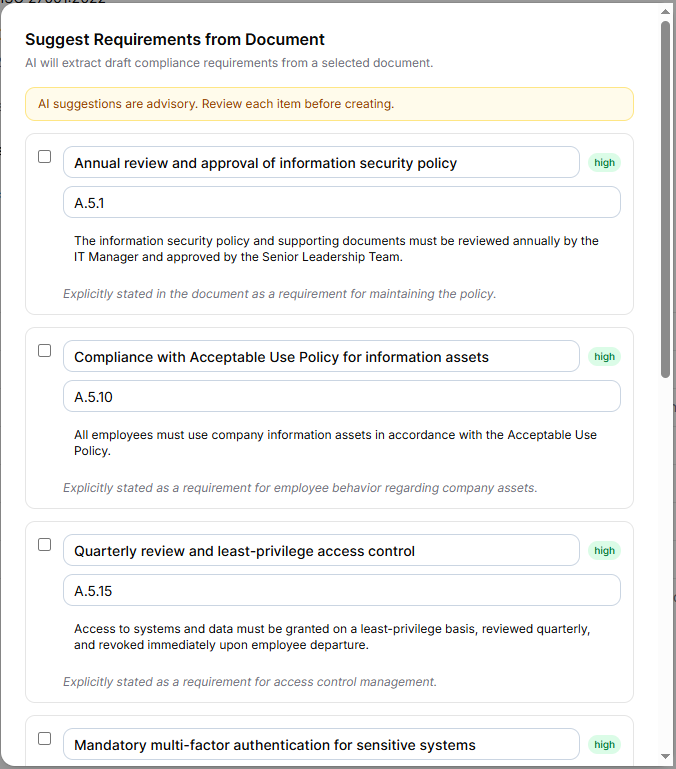
Setting up a tracker is normally the worst part. You sit down with a 40-page policy and translate it into 20 trackable controls by hand. The Suggest from Document feature is the part of this product that can pay for itself in an afternoon.
Point the AI at any uploaded policy (here, an Information Security Policy v2.4) and it returns a list of draft requirements with proper clause references (A.5.1, A.5.10, A.5.15...), suggested titles, descriptions, and a one-line reasoning explaining why it pulled each one. Crucially, every suggestion has a checkbox: you review each item before anything is created. The output isn't a black box, just a fast first draft for you to sanity-check.
The reasoning column is what makes this defensible. Each item shows something like "Explicitly stated in the document as a requirement for maintaining the policy", so when a colleague asks "why is this a control?", you have the AI's answer and the source document one click away.
If you want a simpler starting point before using the full AI tracker, we've created a free SME Compliance Tracker covering the 25 essential policies most UK SMEs need.
- • List required policies across HR, GDPR, and H&S
- • Assign ownership and review dates
- • Identify gaps before audits
Drilling Into a Requirement: AI as Your Compliance Analyst
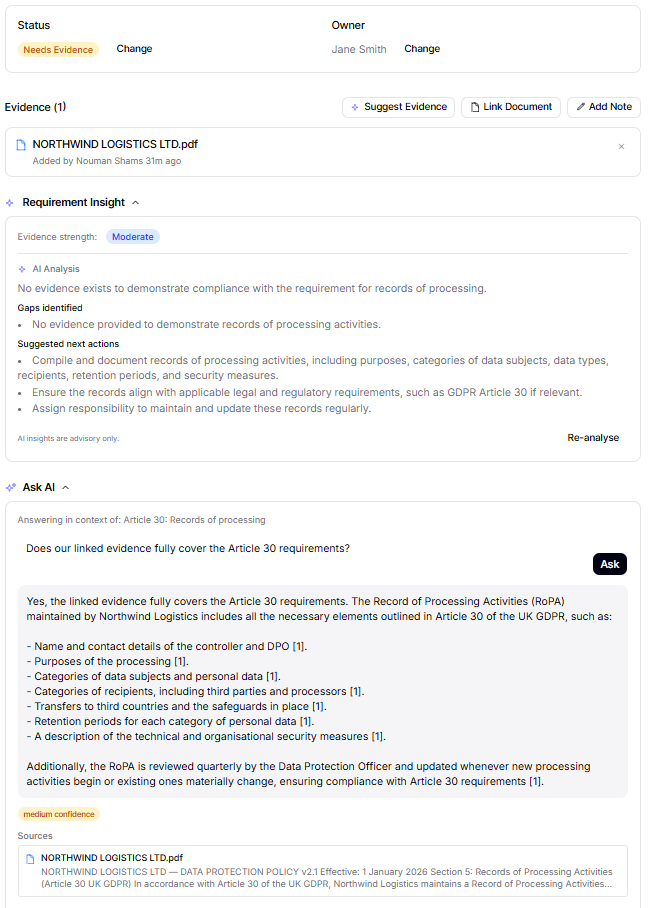
Open any individual requirement and the AI moves with you. Requirement Insight produces a per-control analysis: an evidence strength badge, a list of identified gaps, and a list of suggested next actions. Ask AI is now scoped to just this control, so you can ask a question and get an answer with citations to the documents linked to this requirement specifically.
The most impressive moment in the whole walkthrough lives on this page. Look closely at the panels. Requirement Insight says "No evidence exists to demonstrate compliance with the requirement for records of processing", but the Ask AI answer says "Yes, the linked evidence fully covers the Article 30 requirements."
These look contradictory until you read carefully. The two AI panels are answering different questions: Requirement Insight asks whether operational evidence exists to demonstrate the requirement is being met in practice; Ask AI asks whether the linked document contains the relevant policy language for that requirement. Both answers are correct, just to different questions.
The linked policy describes what an RoPA should contain, which is what the document delivers. But it isn't itself the populated RoPA, the actual records of every processing activity the organisation runs. Policy statements ("we will do X") are not the same as operational evidence ("here's the proof we did X").
If you're not yet tracking evidence at this level, start with our free tracker. It gives you a structured way to:
- • Track policies and controls
- • Assign responsibility
- • Highlight missing evidence
That's exactly the distinction auditors care about. It's also the gap that catches most SMEs out: they have all the right policies, but no operational artefacts behind them. Most AI tools blur this line. This one calls it out.
AI Surfaces the Right Evidence From Your Library
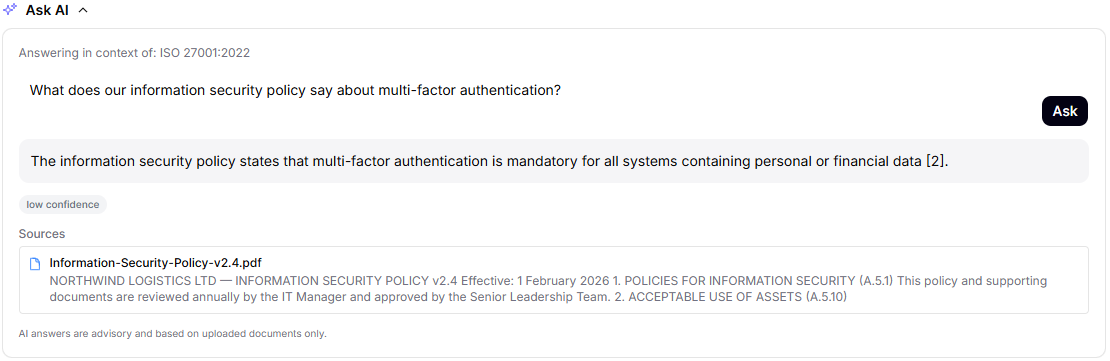
Once your document library has policies in it, you can ask the tracker about them directly. "What does our information security policy say about multi-factor authentication?" returns a one-line answer, citing the actual policy and showing the snippet that backed the claim. The framework context is preserved (the answer is scoped to ISO 27001), and the document is linked rather than paraphrased.
Notice the low confidence badge. The answer is correct and grounded; the AI is humble because it's pulling from a single passage. That's calibration most AI tools never bother with: telling you when it's uncertain, even when it's right. For compliance work, that calibration is the whole game. An over-confident wrong answer costs you a finding; an under-confident right answer costs you nothing.
The Audit Trail Auditors Quietly Appreciate
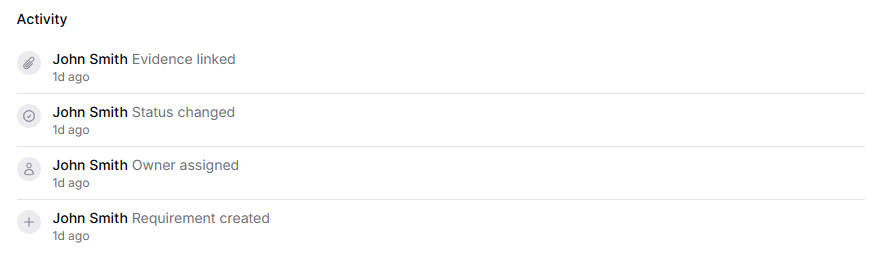
Every state transition on every requirement is logged with a timestamp and a user. Status changes, owner changes, evidence linked or unlinked, comments added: all of it builds a defensible trail. Auditors are not just looking at where you are today; they're looking at how seriously you take compliance between audits. A history showing controls reviewed quarterly, evidence refreshed, and gaps closed in defensible time frames is itself a compliance signal.
This is the part that disappears entirely when compliance lives in spreadsheets. A spreadsheet's "history" is whatever the last saved-over version remembers. The tracker keeps every transition immutable.
What Changes for the Team
The point of all of this isn't tooling. It's what changes for the team running the framework.
Before:
"Yes, we're GDPR compliant." (Followed by a 30-minute search for the data retention policy and an apology to the customer.)
After:
"Yes. Here's our coverage score, the owner of every control, the last review date, and the live policy linked as evidence. Want me to send you a PDF of the section relevant to your due-diligence question?"
What used to take days of preparation now happens in the time it takes to open a dashboard. Compliance stops being a project that happens twice a year and becomes a property of your knowledge base: always current, always provable, always one question away from a defensible answer.
See It On Your Own Frameworks
If you're an SME compliance lead managing GDPR, ISO 27001, Health & Safety, or anything else from a spreadsheet, the fastest way to know whether this changes anything for you is a 30-minute walkthrough on your own data. Not a generic demo: your frameworks, your policies, your gaps. Most teams spot real gaps in the first 10 minutes.
Book a personalised compliance demo
30 minutes on your own frameworks. We'll show you exactly what the tracker would surface for your organisation.
Book your demo →Prefer to explore on your own first? Start with our free SME Compliance Tracker — a practical way to organise your policies before layering AI on top.
Ready to see it in action?
Book a personalised demo and see how DocInsightHub AI can transform your document knowledge.